What construction timelapse is
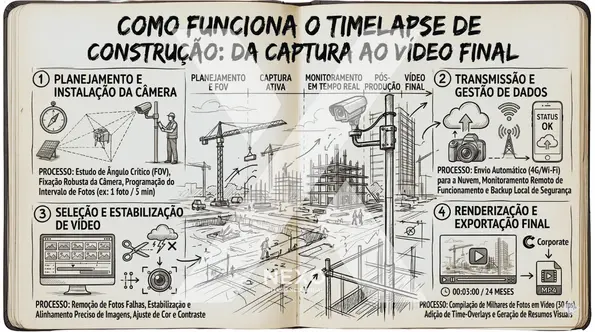
Construction timelapse is a visual documentation technique that captures photographs at regular time intervals, always from the same fixed viewpoint, throughout the entire duration of a project. When these images are compiled into a video, the viewer watches months or years of construction progress in just a few minutes.
The technique has existed for decades, but gained practical relevance in construction with the popularization of high-resolution cameras, low-cost cloud storage and connectivity on construction sites. Today, timelapse is no longer an occasional marketing resource — it is an operational tool that managers, contractors and developers use to document, manage and communicate projects.
The beauty of the technique lies in temporal scale. The human eye, visiting the site weekly, cannot perceive the gradual evolution of a structure growing a few centimeters per day. Timelapse compresses this time and makes the evolution immediately visible — revealing details and patterns that would otherwise go completely unnoticed.
Step 1: Planning and camera positioning
The most important decision in a timelapse project is also the first: where to position the camera. A poor choice at this stage cannot be corrected later — moving the camera mid-project destroys the visual continuity of the archive.
The ideal framing covers the area of highest activity in a single angle, with enough space to capture the vertical growth of the structure without it "leaving the frame" in the final phases. The camera must be elevated enough to avoid obstructions (machinery, containers, other workers moving on site) and protected against direct sunset or sunrise incidence that would cause image saturation at certain times.
For large projects, with multiple blocks or large horizontal extents, a single angle may be insufficient. In this case, multiple cameras with complementary framings guarantee complete coverage — each capturing a different perspective of the same project.
Step 2: Defining the capture interval
The interval between captures directly determines two things: the volume of data generated and the "speed" at which the project moves in the final video. There is no universally correct interval — it depends on the type of project and the intended use of the material.
- Intervals of 1 to 5 minutes: capture many movement details (people, machines, trucks), but generate massive data volumes. Recommended when operational analysis of the site is as important as structural progress documentation.
- Intervals of 10 to 30 minutes: balance between richness of detail and data volume. Suitable for most construction projects lasting months.
- Intervals of 1 hour or more: capture only significant structural changes, with reduced data volume. Suitable for long-duration projects where the primary goal is the final video — not process analysis.
For typical construction projects, capturing one photo every 10 minutes during working hours produces a balanced result: enough detail to identify specific activities, with manageable data volume over months.
Step 3: Equipment protection on site
A construction site is a hostile environment for cameras. Suspended dust, rain, mud spray from machines, temperature variations between 5°C and 50°C throughout the year, constant vibration from compactors and jackhammers — all of this affects equipment not designed for this type of exposure.
Consumer cameras (including action cameras and conventional DSLRs) typically do not survive more than a few months under these conditions without showing failures. For projects that need to last 12, 18 or 24 months, the equipment must have industrial-grade protection: housings with IP67 rating or higher, resistant to dust and water ingress, with high-transmission optical glass that does not fog due to temperature changes.
Mounting is also critical. The camera must be fixed on a rigid structure independent of the construction — not on scaffolding that will be removed, not on walls that will be demolished, not in locations that will undergo adjacent construction work. Any physical displacement of the camera creates an irreparable visual discontinuity in the archive.
Step 4: Storage and data redundancy
A camera capturing high-resolution images every 10 minutes generates between 200 and 400GB of data per year. This volume needs a storage strategy that guarantees zero data loss throughout the entire duration of the project.
The safest approach is dual redundancy: temporary local storage on the device itself (to ensure continuity even during connectivity failures) combined with automatic and continuous synchronization to at least two independent cloud destinations. If one server fails, the other maintains the complete history intact.
Memory cards, external drives on site, or dependence on a single cloud server are solutions that may seem adequate at the start and become single points of failure months later — when there is no longer any way to recover what was lost.
Step 5: Editing and generating the final video
With the complete image archive, the editing process transforms raw photographs into a coherent and impactful video. The main steps include:
- Selection and filtering: removal of nighttime images (when there is insufficient lighting), frames with temporary obstructions (such as a dirty camera or object in front of the lens) and captures with technical exposure problems
- Color correction and deflickering: each camera slightly adjusts exposure between frames, creating a "flickering" effect in the video. The deflicker process smooths these variations for a fluid visual progression
- Speed definition: the frames per second in the final video determines the apparent speed of the project. A 12-month project can be compressed into 3, 5 or 10 minutes depending on the objective
- Soundtrack and narration: music and narration contextualize the video for presentation to clients or investors who did not follow the project
- High-resolution export: the final video must be exported in sufficient quality for projection on large screens — a project that lasted two years deserves a proportionately high-quality file
"The final timelapse video of a construction project is often the highest-impact content a contractor has ever produced about that project — and it is generated automatically, as a byproduct of the documentation that was already happening."
How NEXO simplifies the complete process
This entire process — positioning, configuration, protection, storage, monitoring and video generation — can be outsourced or centralized in a dedicated system. The NEXO platform handles every step: the camera is installed with industrial protection, interval settings are configured remotely, storage is redundant across two cloud servers, and the daily timelapse is generated automatically every night.
The practical result is that the site team accesses the platform in the morning and finds the previous day's timelapse already available — without having taken a single photo manually, without operating any editing software. The complete historical archive is available for consultation, export and sharing with clients at any time.